


Launch Offer · ArtiQverse Pro €99 Get the Bundle
New Introducing ArtiQverse 2.0

Write it once. Play it everywhere.

The articulation system for composers who work across DAWs. One map for Cubase, Nuendo, Dorico, Logic Pro, Fender Studio Pro, Digital Performer, Reaper and Cakewalk. Now you play it in, tag it and audition it instead of typing it out.

SymphoniQ presents

ArtiQverse

The complete articulation system for the virtual orchestra.

ArtiQverse 2.0

Rebuilt from the keyswitch up.

Version 2.0 changes how a map gets made. You pick keys on a ring or play them in, ArtiQverse predicts the next one, tags names by the patterns you set, and lets you hear every switch before your DAW ever sees the file.

  • Batch Convert to Dorico One .doricolib per map, or every map in one library.
  • Undo for everything One field entry, one step. Every action, one step.
  • Edit many at once Absolute or relative, confirmed with Shift+Enter.
  • Cover art in the map Product images and supplementary files travel inside the .artiq.
  • High Contrast look View › Increase Contrast, everywhere in the app.
  • Several windows Compare and copy between maps side by side.
13,971/13,971

articulations survived the trip from Cubase to Dorico and back, and from Dorico to Cubase and back. Across 541 real-world maps, not one was lost.

3in4

keyswitches predicted before you type them. Measured on 541 real-world maps.

98%

of CC numbers predicted correctly, across 3,182 maps in iQSpace.

298+277

Dorico playback techniques and Cubase 15 built-ins, each under its own name.

8DAWs

written from one source map, including Nuendo and Cakewalk.

Walkthrough

All eight movements, in twelve minutes.

The workflow, recorded in the app. No mock-ups.

Movement IMaestoso

The map, re-engineered.

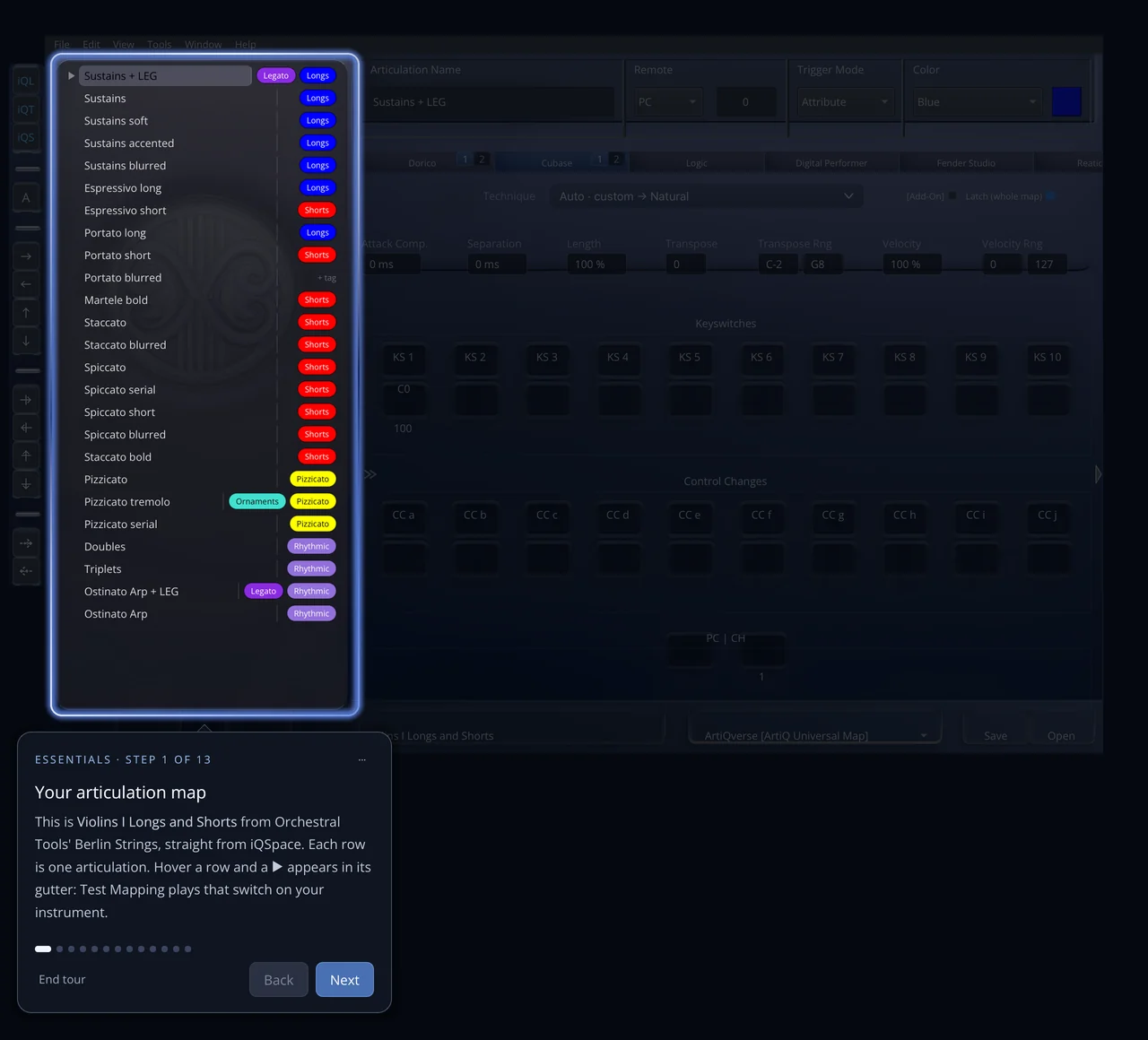
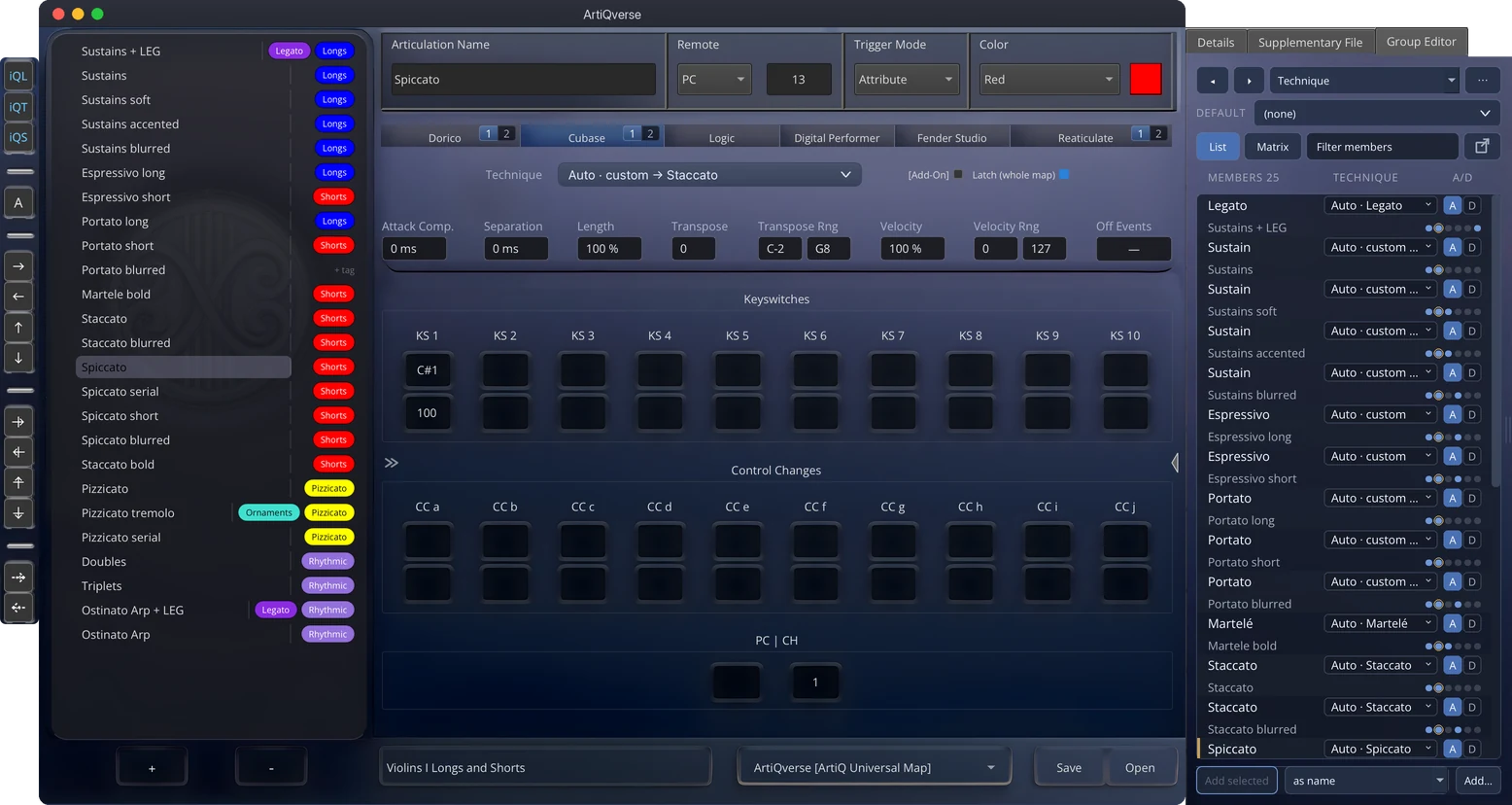
The ArtiQverse 2.0 main window with the toolbox, the tagged articulation list, the editor on the Cubase tab and the side panel's Group Editor
  1. 01

    One window. The whole instrument.

    The articulation list, the editor and the side panel. Shown here with Orchestral Tools' Violins I, straight from iQSpace.

  2. 02

    Tagged and coloured on arrival.

    iQTag matches each name against your patterns and adds its chips: Longs, Shorts, Legato, Pizzicato. Hover a row and ▶ auditions it.

  3. 03

    Ten keyswitches. Ten CC pairs.

    Keyswitches with velocities, controllers, program change and channel. Whatever a library switches with, you set it per articulation.

  4. 04

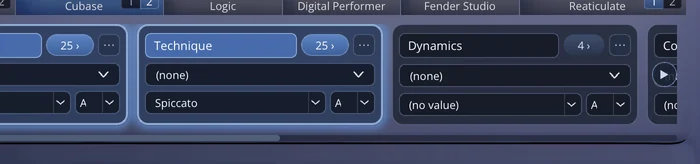
    Six DAWs, one row of tabs.

    Pick a technique once; ArtiQverse matches it by name in every other DAW. Cubase and Dorico get their real technique names.

  5. 05

    Groups, as many as you need.

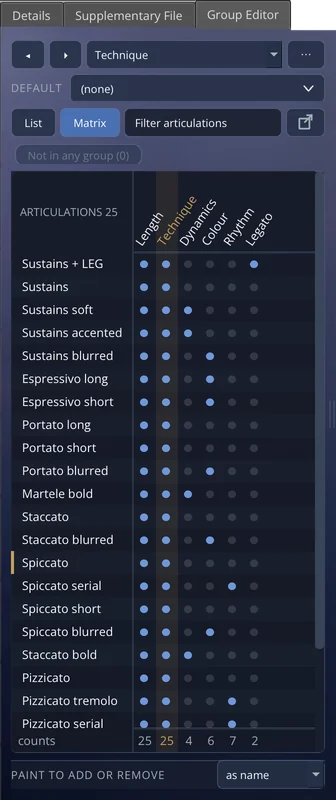
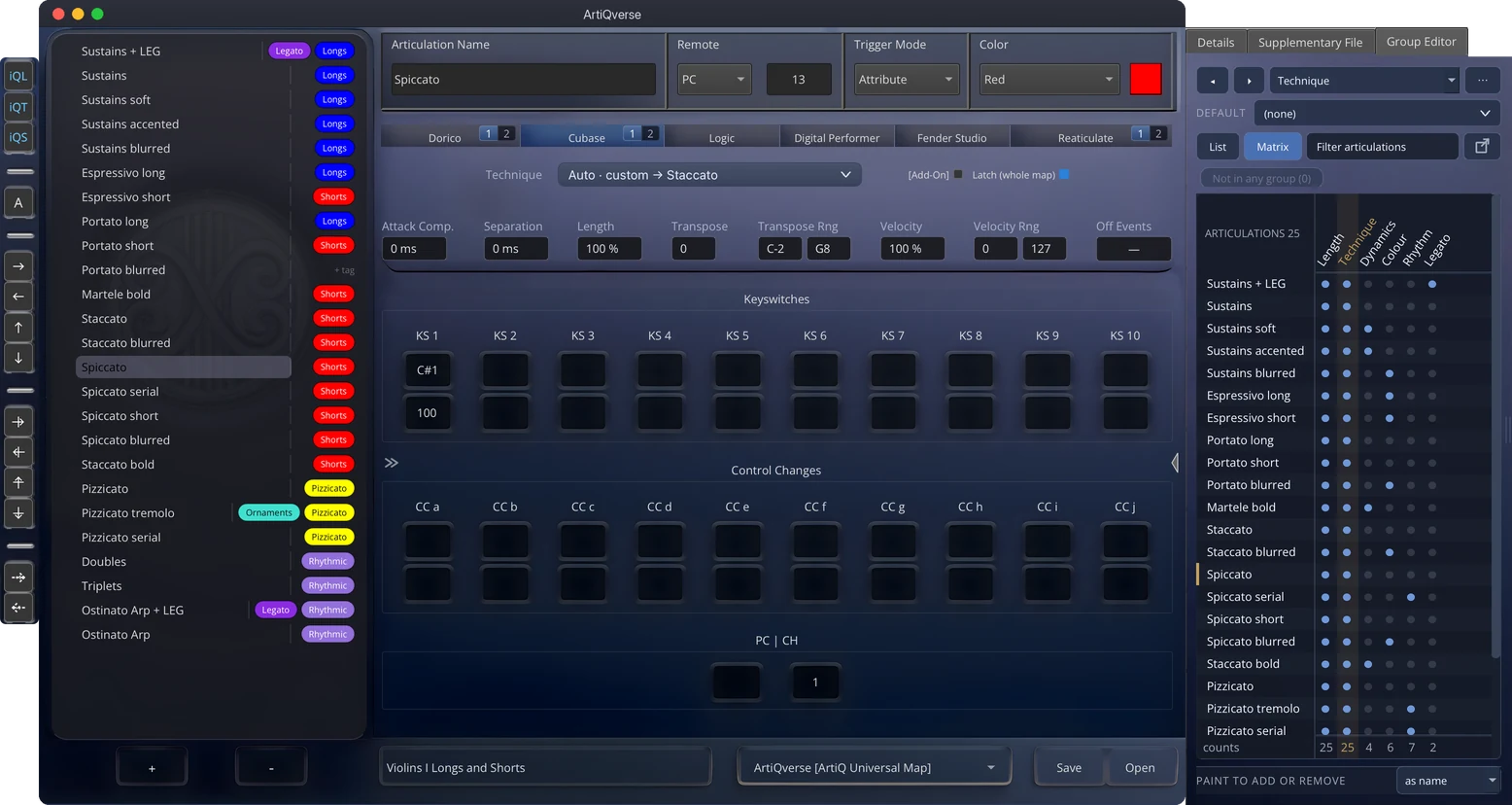
    The Group Editor gives a group the panel's full height. Switch to the Matrix and paint memberships across all of them.

Movement IICon brio

Played, not typed.

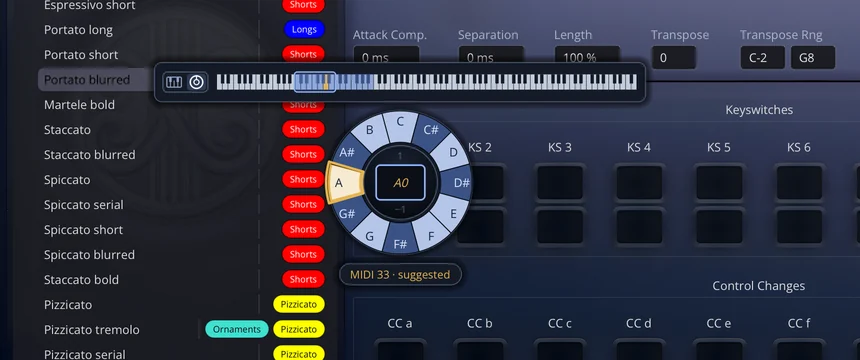
Most maps follow a pattern. The keyswitches climb one key at a time, or one controller steps through a few values. ArtiQverse 2.0 predicts the next key from the step between the two rows above and shows it in gold before you reach for it. Press → to take it. Or play the key on your MIDI keyboard.

Try it

This one is a replica. The real one is better.

Hover a note to see which articulation uses it. Click to pick. To change octave, scroll over the centre or press ↑ ↓. In ArtiQverse, every pick also switches your instrument through Test Mapping.

  • Gold: the key ArtiQverse predicts next
  • Used by another articulation
1 A0 −1

MIDI 33 · suggested

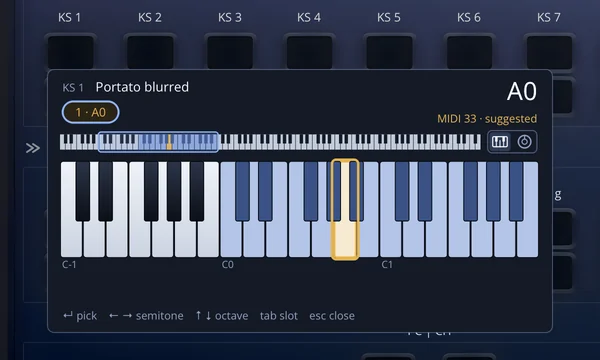
The keyswitch picker's keyboard form: three octaves, a chip per keyswitch slot and A0 suggested
Keyboard form. Three octaves, a chip for every keyswitch slot, and the same next-key hint. ArtiQverse opens the form you used last.
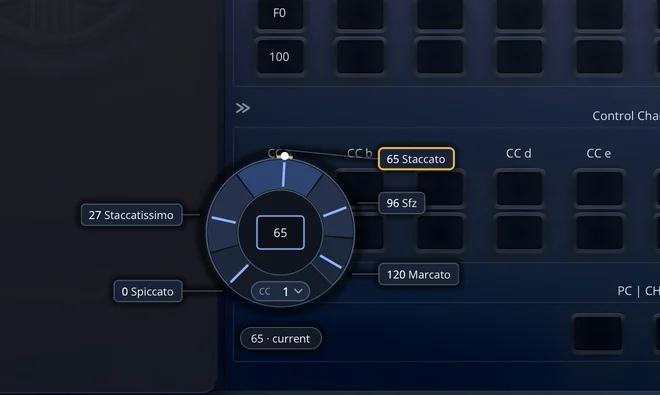
The CC dial: 0 to 127 over the ring, five named stops and the CC 1 chip
The CC dial. 0 to 127 around the cell. Stops name the articulations that share this keyswitch; press C to choose any controller by number or name.
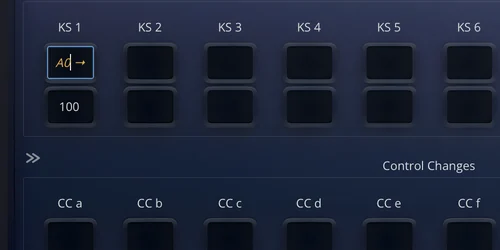
An empty KS 1 cell suggesting A0 in gold, with an arrow to take it
Gold hints. An empty cell shows the key that comes next. New articulations arrive with every suggested keyswitch and the CC pairs of the row above already filled in.

Movement IIIDolce

Heard before it's exported.

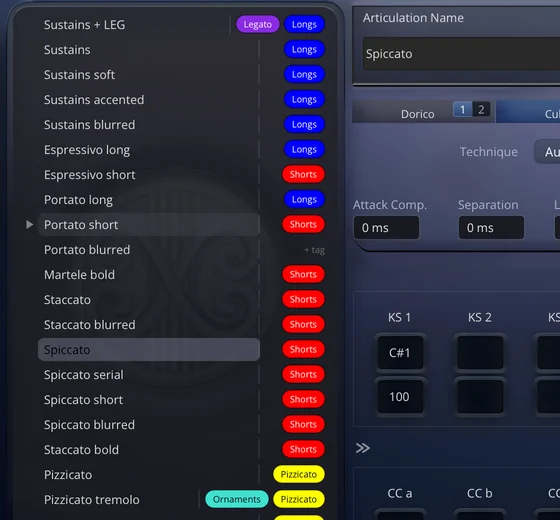
Test Mapping sends an articulation's keyswitches, controllers and program change out over MIDI, then plays a test note. You hear the switch land in your sampler while you're still mapping, not two hours later in the DAW.

  • Hover any row and press ▶, or Cmd/Ctrl+T
  • On macOS the built-in ArtiQverse Virtual Port needs no setup; on Windows, any virtual MIDI cable
  • Every key you pick on the ring and every value on the dial switches your instrument as you pick
  • Audition note and length are yours to choose (C3, 500 ms by default)
MIDI out · ArtiQverse Virtual Port
  1. Note OnC#1 · vel 100 · ch 1keyswitch
  2. Note OffC#1
  3. Note OnC3 · vel 100test note
  4. Note OffC3500 ms
The play control in the articulation list's gutter

Movement IV · iQTagBen marcato

Tagged your way.

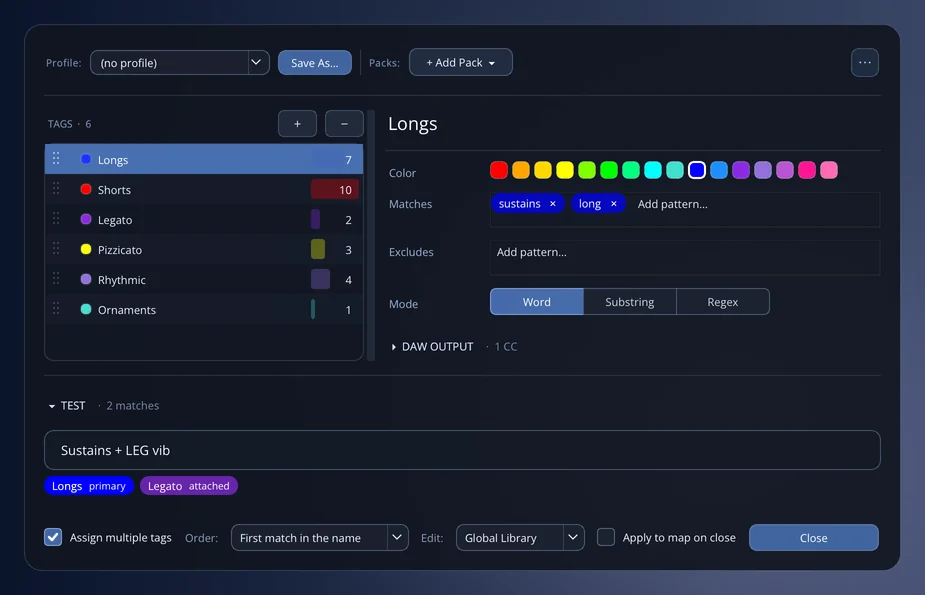
A tag is a category (Longs, Shorts, Legato) with a colour, the name patterns that attach it and, if you like, default MIDI triggers. Set your patterns once and ArtiQverse tags, colours, sorts and even pre-wires every articulation in every map you open, create, rename or capture.

Strings · Shorts & LongsUntagged
    1. Read. You type or paste the names, open a map, or let iQLense capture them.
    2. Tag. Patterns match in Word, Substring or Regex mode; excludes veto the near-misses.
    3. Sort. Auto-Resort orders the list by tag priority. Restore Loaded Order undoes it in one step.
    4. Wire. Apply Tag Defaults fills keyswitches, CCs and program changes in bulk, for one map or a whole folder.
    The iQTag editor: six tags with their match counts, the Longs tag's colour and patterns, and the TEST band tagging 'Sustains + LEG vib'
    The Tag Editor. The TEST band shows exactly how a name will be tagged while you edit the rules. Save a library as a Profile, merge Packs, share both as files.

    Movement VA due

    Fluent in Cubase 15. Native in Dorico.

    The two most demanding expression-map formats, supported to the last parameter and kept in step with each other. Both programs share playback technique IDs, so a technique you pick for Dorico reaches Cubase exactly.

    Cubase 15 & Nuendo

    The Cubase tab's groups editor: a strip of group cards with member counts
    • As many flexible groups as the library needs, in files Cubase 14 and earlier can still read
    • All 277 Cubase 15 built-in techniques, custom techniques with fallbacks and aliases
    • Add-on sound slots, Latch mode and a default technique per group
    • Attack compensation, separation, length, transpose and velocity ranges, off events
    • Classic and Cubase 15 files detected on load, no questions asked

    Dorico

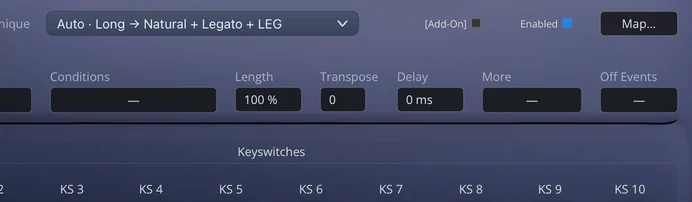
    The Dorico tab: the technique combination, Conditions, Length, Transpose, Delay, More and Off Events
    • All 298 playback techniques, under Dorico's own names and groups
    • Each switch's dynamics, conditions, length, transpose, delay and switch-off actions
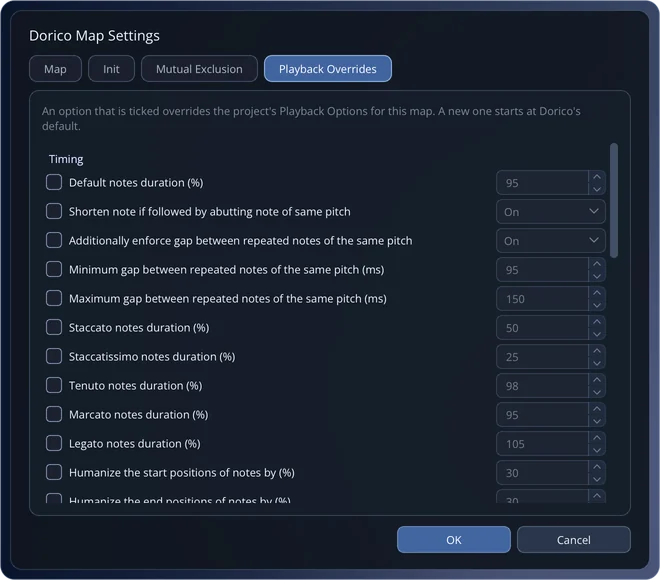
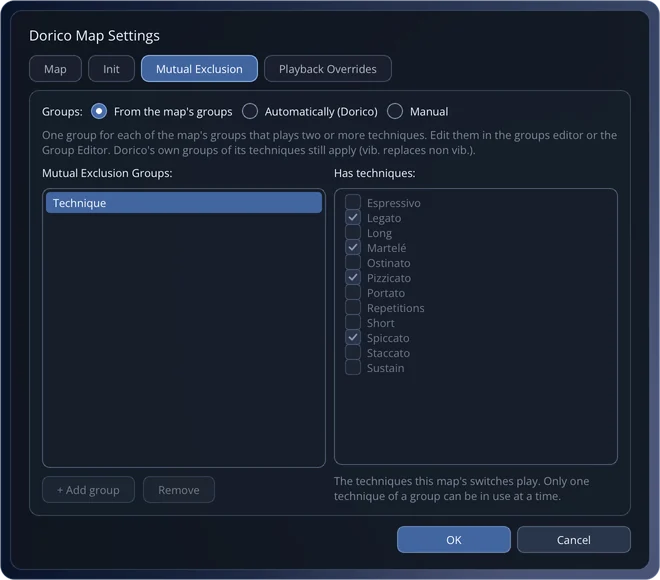
    • Map settings: Init actions, mutual exclusion groups, 35 playback overrides
    • The map keeps its ID, so Import Library replaces it instead of adding a copy
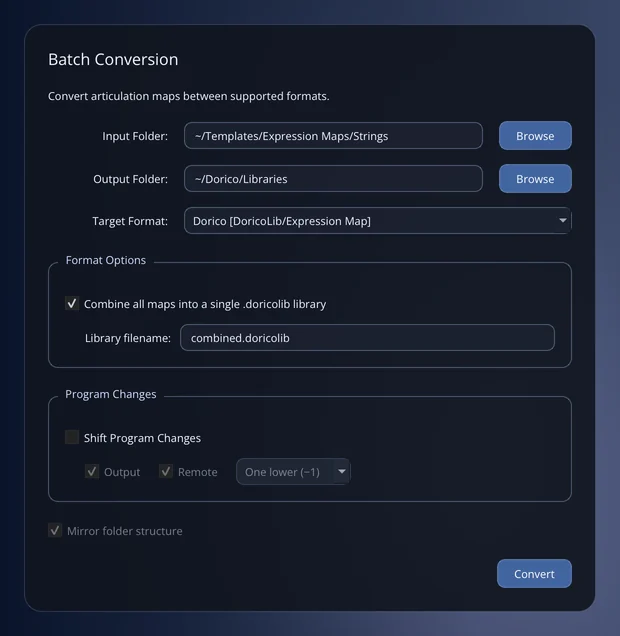
    • Batch Convert writes .doricolib libraries, or every map into one

    Lossless, both ways. ArtiQverse keeps everything a Dorico library holds and writes it back the way Dorico wrote it. We re-saved our exports in Dorico 6 and got text-identical files back. Cubase 15 did the same with our exports of Dorico imports.

    Dorico Map Settings, Playback Overrides page
    All 35 Playback Overrides, named as in Dorico.
    Batch Conversion to Dorico, combining all maps into a single .doricolib library
    Batch Convert a template folder into one Dorico library.
    The Group Editor Matrix: memberships of 25 articulations in six groups
    The Matrix: drag to paint memberships.

    Movement VI · iQLenseLeggiero

    Point it at the plug-in.

    iQLense reads articulation names straight off your screen and turns them into a map. Press the capture hotkey in any application (your DAW included), draw a box around the list, and the names land in ArtiQverse already tagged.

    • A floating puck, always one click away; Cmd/Ctrl+Shift+L from anywhere
    • One Undo takes back a whole capture
    • Included with every ArtiQverse licence

    Recorded in ArtiQverse 2.0, in the welcome tour's practice panel.

    iQLense Pro add-on

    It doesn't read manuals. It plays every switch.

    iQLense Pro plays every keyswitch, CC and program change your instrument answers to, reads the name it shows each time, and writes a DAW-ready map with its whole switching logic. It's built for modern orchestral libraries with layered, multi-page articulation matrices.

    • Unlimited hierarchy levels: banks, then articulations, then variants
    • Notes, velocity ranges, CCs and program changes; three analysis modes for text and graphical UIs
    • Presets per instrument, exported and shared as files
    • A Floating PRO Editor beside your plug-in; everything runs offline, so it's safe for NDA work

    Requires an ArtiQverse licence.

    Movement VII · iQSpaceInsieme

    Maps you don't have to make.

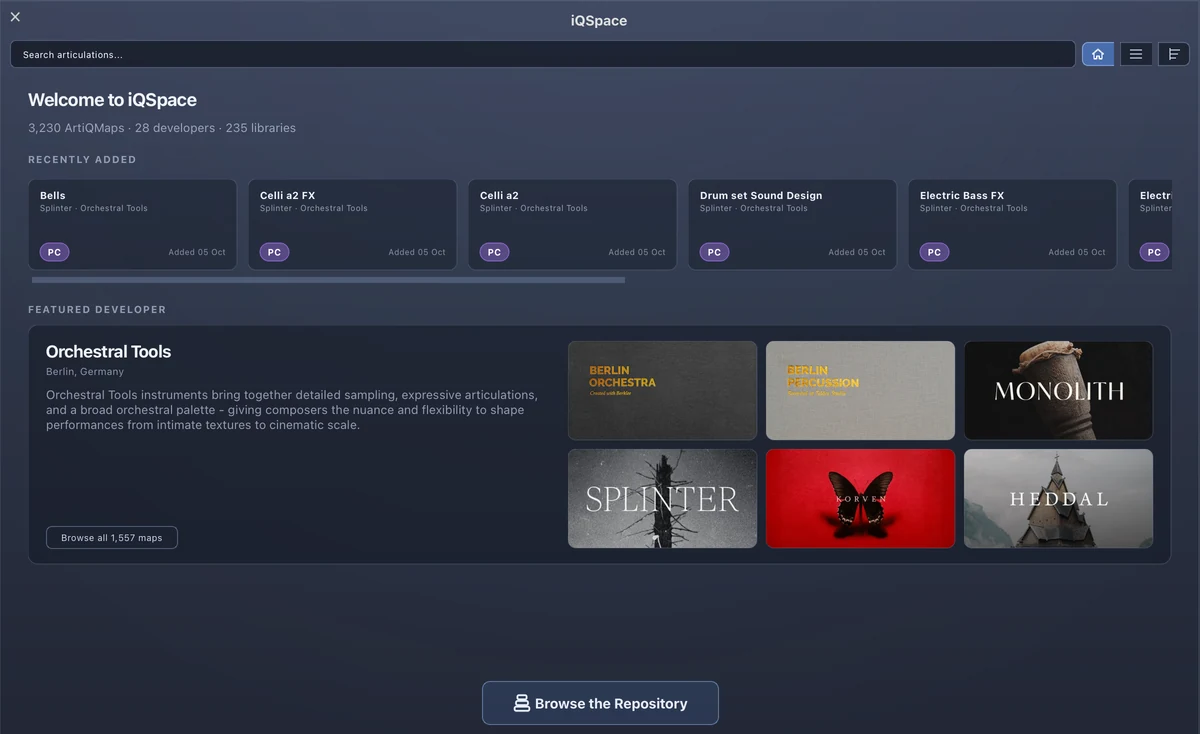
    Ready-made articulation maps, shared by composers and organised by developer and library. Import one in a click, rate it, improve it, share yours back. Cover art, metadata and attached instrument presets travel with every map.

    3,230ArtiQMaps
    235libraries
    28developers
    iQSpace in ArtiQverse 2.0: the home page with catalogue statistics, recently added maps and a featured developer
    Orchestral Tools8DioSpitfire AudioSoundironVienna Symphonic LibraryEastWestMUSIOStrezov SamplingProjectSAMCinematic Studio SeriesCinesamplesSonokineticAudio ImperiaImpact SoundworksNative Instruments

    Movement VIIITutti

    One source. Every DAW, on camera.

    Recorded on our machines: one map, exported from ArtiQverse 2.0 and imported into each DAW. No mock-ups.

    Cubase & Nuendo.expressionmap
    Dorico.doricolib
    Logic Pro.plist
    Fender Studio Pro.keyswitch
    Digital Performer.dpartmap
    Reaper (Reaticulate).reabank

    Vln. I · legato → .expressionmap .doricolib .plist .keyswitch .dpartmap .reabank .artiq

    Cubase / Nuendo.expressionmapCubase 15 schema with flexible groups; readable by Cubase 14 and earlier
    Dorico.doricolibOne map or many per library; Dorico 6 settings kept
    Logic Pro.plistArticulation Set
    Fender Studio Pro (Studio One).keyswitchSound Variations, with Fender Studio's 50 symbols
    Digital Performer.dpartmapArticulation Map
    Reaper (Reaticulate).reabankOne bank, or every instrument in one combined file
    Cakewalk.expressionmapvia Cakewalk's expression map import
    ArtiQverse Universal.artiqEverything above, plus tags, cover art and attached presets

    Coda · the welcome tourDa capo

    Ten minutes to fluent.

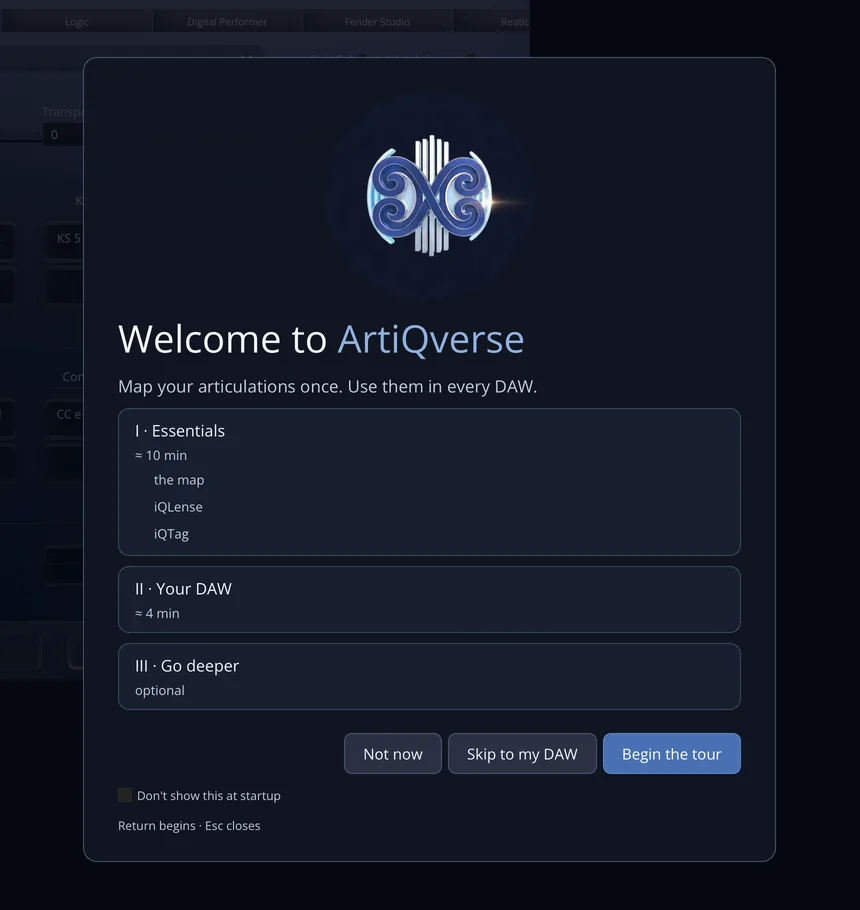
    The welcome tour shows ArtiQverse at work in a window of its own: a demo map, coach marks on the real controls, and a cursor that types and clicks for you. It never touches your maps, files or settings.

    1. I · Essentials≈ 10 minThe map, iQLense with a practice capture, iQTag
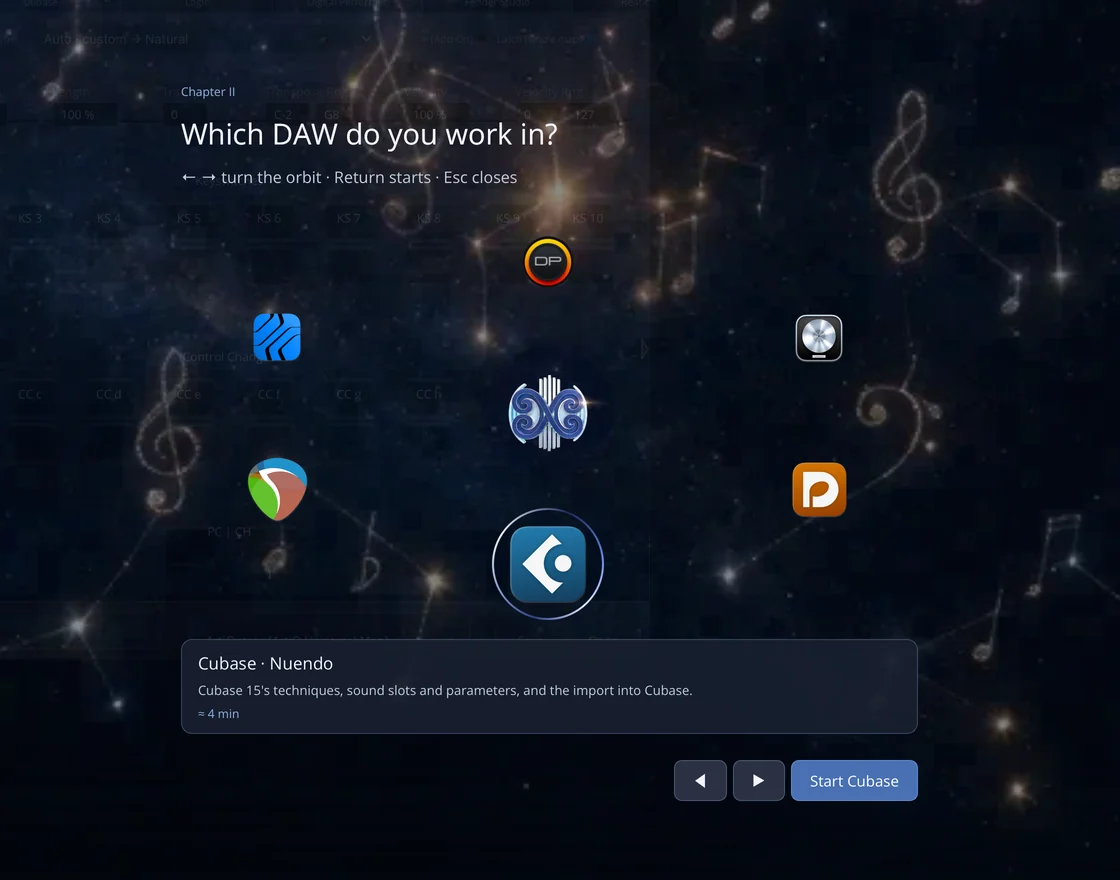
    2. II · Your DAW≈ 4 minChoose from the Orbit; ends on a recording of your DAW importing the map
    3. III · Go deeperoptionalCubase and Dorico deep dives, Batch Convert, Test Mapping, Shift Program Changes

    ArtiQverse 2.0

    Score the film. Not the setup.

    One licence covers every DAW you run, and the 7-day trial lets you prove it on your own template first. iQLense is included. iQLense Pro is an add-on.